
CMS Aligned Networks Developer Documentation
Prerequisites
- Application has met the requirements and has been listed in the Medicare App Library
- Application has provided a URL to JWK Set to the Blue Button API team
Approach
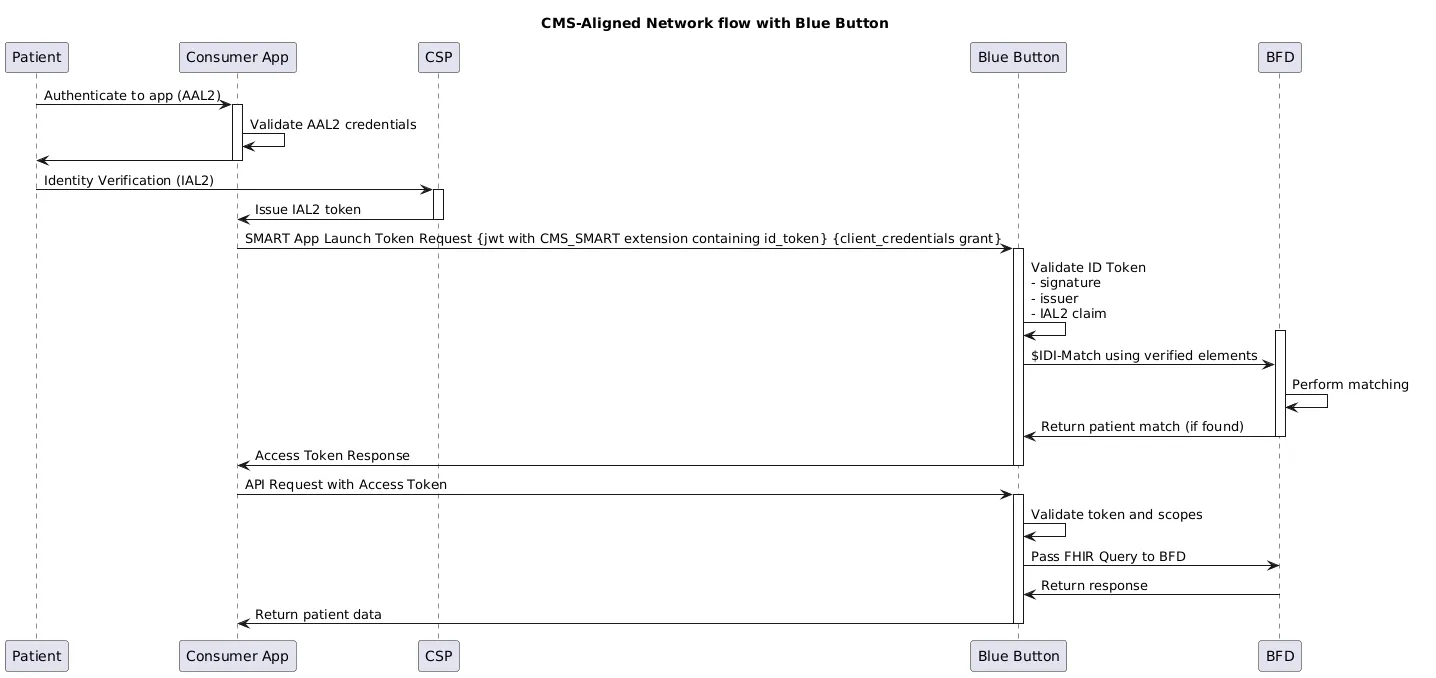
For applications that are approved as part of a CMS Aligned Network, Blue Button API will allow for the use of the client_credentials grant, in combination with asymmetric authentication, to receive an access token. When using this flow, a beneficiary will not be required to log in via medicare.gov. A diagram of the flow is below. This is in contrast to the existing authorization_code + symmetric authentication flow requiring a portal login.
Technical Requirements
Blue Button API will only accept the client_credentials grant type when an extension, cms_smart, is present in the authentication JWT claims.
cms_smart is modeled off the tefca_smart extension that was present in the 2024 Facilitated FHIR Implementation Guide.
Parameters
Parameters in POST request to Blue Button API’s /token endpoint for CMS-aligned networks flow:
| Element | Optionality | Requirement |
|---|---|---|
grant_type | required | Must be: client_credentials |
scope | required | Any values from Blue Button API’s ./well-known/smart-configuration are valid. Example:
|
client_assertion_type | required | urn:ietf:params:oauth:client-assertion-type:jwt-bearer |
client_assertion | required | Signed Authentication JWT value |
POST to Blue Button API /token endpoint:
Header: "Content-Type": "application/x-www-form-urlencoded"
Example Parameters:
{ "grant_type": "client_credentials", "scope": "patient/Patient.rs patient/Coverage.rs patient/ExplanationOfBenefit.rs launch/patient profile", "client_assertion_type": "urn:ietf:params:oauth:client-assertion-type:jwt-bearer", "client_assertion": "{YOUR_JWT_HERE}"}Authentication JWT Header
| Element | Optionality | Requirement |
|---|---|---|
alg | required | Only RS384 and ES384 allowed |
kid | required | Must be a kid present in the JWK Sets available at the url registered with Blue Button. |
typ | required | Fixed value: “JWT” |
Authentication JWT Claims
| Element | Optionality | Requirement |
|---|---|---|
iss | required | Your Blue Button API Client ID |
sub | required | Your Blue Button API Client ID |
aud | required | Blue Button API token endpoint. https://{ENVIRONMENT}.bluebutton.cms.gov/v3/o/token |
jti | required | unique |
exp | required | JWTs must not be expired. Shall not be > 300 seconds from now (SMART requirement) |
extensions | required | cms_smart extension required. Defined below |
cms_smart Extension Definition
| Element | Optionality | Requirement |
|---|---|---|
| version | Required | Fixed string value: “1” |
purpose_of_use | Required | Fixed value: “PATRQT” 1 |
consent_policy | Optional | Not defined for initial implementation |
consent_reference | Optional | Not used for initial implementation |
id_token | Required | CSP-issued ID token containing identity assertions. Must be IAL2 |
Example decoded JWT containing the cms_smart extension:
Example Header:
{ "alg": "RS384", "kid": "my-key-id-1", "typ": "JWT"}Example Claims:
{ "iss": "my-client-id-1", "sub": "my-client-id-1", "aud": "https://sandbox.bluebutton.cms.gov/v3/o/token", "jti": "8b4b7fab-93ed-4e59-9935-f9244d90b516", "exp": 1774651583, "extensions": { "cms_smart": { "version": "1", "purpose_of_use": "PATRQT", "id_token": "{YOUR_ID_TOKEN_HERE}" } }}ID Token Requirements
Blue Button API will perform patient matching based upon the presence of an IAL2 id_token provided by a registered client application. It will seek specific fields in the id_token’s claims.
Only CLEAR and ID.me are supported at the outset. Blue Button API’s sandbox environment will only accept ID tokens issued by CLEAR or ID.me’s lower environments, and Blue Button API’s production environment will only accept ID tokens issued by CLEAR or ID.me’s production environments.
ID Token JWT Header
| Element | Optionality | Requirement |
|---|---|---|
alg | required | Must be RS256 |
kid | required | Must be a kid present in the CSP’s jwks endpoint |
typ | required | Fixed value: “JWT” |
ID Token JWT Claims
| Element | Optionality | Requirement |
|---|---|---|
iss | required |
|
sub | required | CSP client-specific ID for the beneficiary. Currently not used. |
aud | required | MAY be an array |
jti | required | unique |
exp | required | JWTs must not be expired |
iat | required | JWTs must not be more than 5 minutes (300 seconds) old |
identity_assurance_level | required | Must > = 2 in CSP-signed payload |
auth_time | required | must be < 24 hours old |
family_name | required | Expected Character Space: Latin/ASCII + Latin-1 Supp/Ext |
given_name | required | Expected Character Space: Latin/ASCII + Latin-1 Supp/Ext |
birthdate | required | YYYY-MM-DD |
gender/sex_legal | Optional | |
address | Optional | See below for address format |
historical_address | Optional | See below for address format |
mbi | Optional | Not currently used |
ssn_itin_short | Optional | Last 4 of ssn/itin |
phone_number | Optional | Normalized to E.164. Not currently used |
email | Optional | Not currently used |
csp_uuid | Optional (for now) | Not currently used |
Address Fields
| Element | Optionality | Requirement |
|---|---|---|
street_address | Optional | Street Address |
address_line2 | Optional | Line 2 |
locality | Optional | |
region | Optional | |
postal_code | Optional | |
country | Optional | |
formatted | Optional |
Using the Blue Button API
After successfully POSTing a token to Blue Button API’s /token endpoint, it will attempt to find a unique match using the approved CMS matching algorithms. If a unique match is found, then an access token will be issued, with a token validity of 30 minutes, and refresh capability of up to 24 hours. If no match is found, an error will be returned to that effect.
Access tokens issued using this flow have the same capabilities of access tokens issued using the portal login authorization_code flow. To query for claims, coverage, or patient data, utilize the Patient, ExplanationOfBenefit, and Coverage resource paths:
/v3/fhir/ExplanationOfBenefit//v3/fhir/Patient//v3/fhir/Coverage/
In addition, a new operation exists to pull in digital insurance card elements per the C4DIC Implementation Guide:
/v3/fhir/Patient/$generate-insurance-card
CLEAR and ID.me Test account information
CLEAR Test Patients
ID.me Test Patients
| Name | Password | |
|---|---|---|
| Allison Hackett | ahackett@gmail.com | IDme2026!! |
| Damon Mychart | dmychart@me.com | IDme2026!! |
| Dog Beaker | dogbeaker@aol.com | IDme2026!! |
| Barbara Testa | btesta@hotmail.com | IDme2026!! |
| Tracy CraneTest | tcranetest@gmail.com | IDme2026!! |
| Camila Maria Lopez | knixontestemail@epic.com | IDme2026!! |
| Derrick Lin | knixontestemail2@epic.com | IDme2026!! |
| Homer J Simpson | hsimpson@gmail.com | IDme2026!! |
Patient Matching Criteria
Approved field combinations that Blue Button API currently supports:
- First Name + Last Name + DOB + Street Line
- First Name + Last Name + DOB + SSN Last 4
- First Name + DOB + MBI